
MTD-Ready Spreadsheet Kit
Keep your spreadsheet. Make it MTD-ready.
An Excel workbook that keeps your digital records in HMRC's own categories and adds up every quarterly update for you, ready for bridging software to send.
- Self-employment and landlord tabs, in the SA103F and SA105 categories
- Cumulative "send in update" figures worked out automatically
- Mileage at HMRC's 55p rate, use of home, capital items and year end
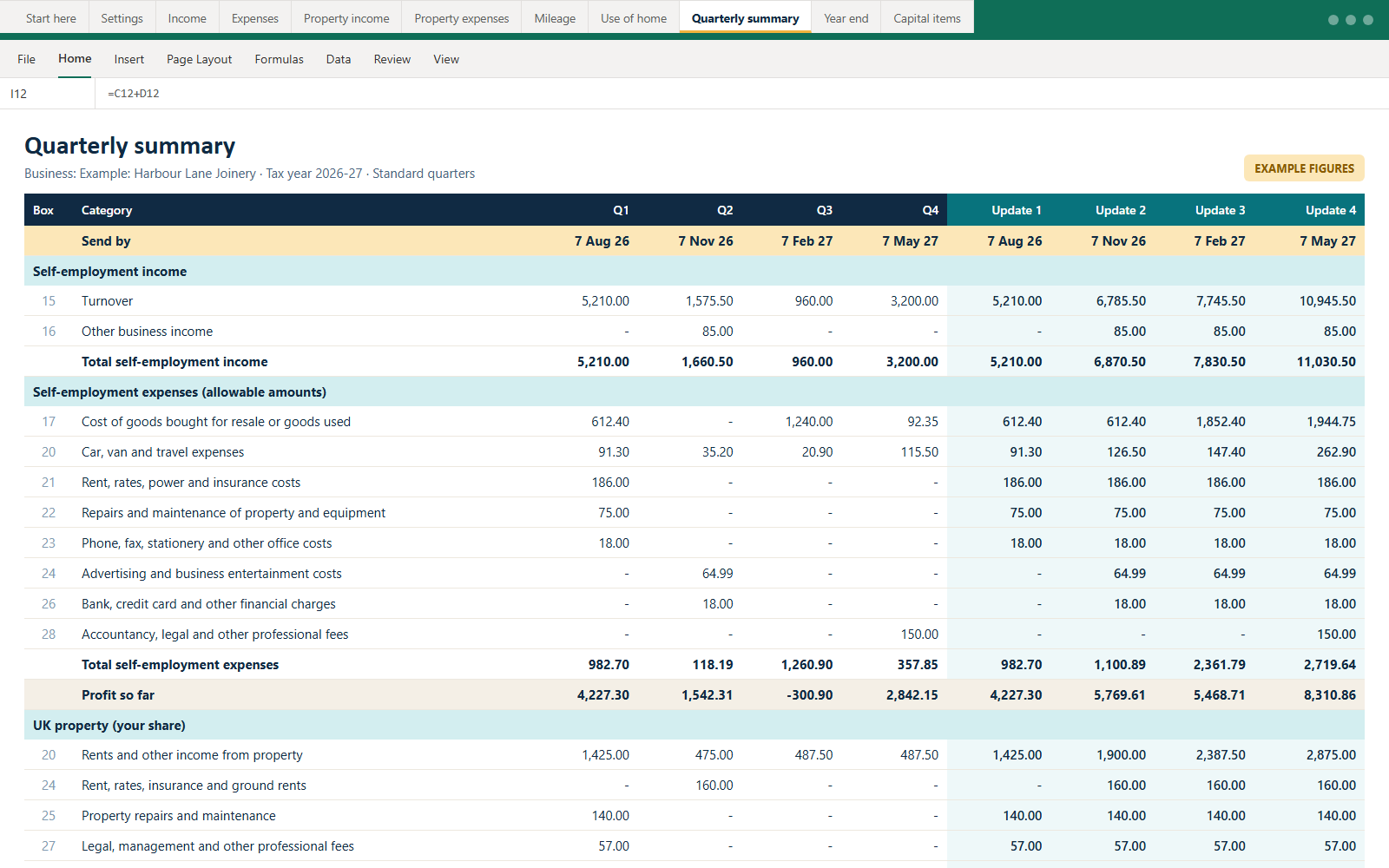
The Quarterly summary tab, with example figures.
What's inside
Eleven tabs. One calm routine.
Cream cells are for you. Teal cells calculate themselves and are protected, so a stray keystroke can't break a formula.
Start here
Eight steps, a colour key and links to HMRC’s software finder.
Settings
Pick your tax year and quarter type, and quarter dates and deadlines fill in.
Income
One row per payment: date, amount, Turnover or Other income.
Expenses
The 14 SA103F categories, with a column for the non-allowable part.
Property income & expenses
SA105 categories, joint-ownership shares and finance costs kept separate.
Mileage
55p a mile for the first 10,000 (2026–27 on), 25p after, 24p for motorbikes, per vehicle.
Use of home
HMRC’s £10 / £18 / £26 monthly flat rates, by hours worked.
Quarterly summary & year end
Totals by category and quarter, a deadline tracker and SA103F/SA105 box totals.
How it works with HMRC
Record. Total. Send.
- 1
Record
Add income and expenses as they happen: date, amount, category.
- 2
Total
The Quarterly summary adds up the year so far for each category.
- 3
Link
Point HMRC-recognised bridging software at the "Send in update" cells.
- 4
Send
Send by 7 Aug, 7 Nov, 7 Feb and 7 May, then tick it off in the tracker.
No spreadsheet can send updates to HMRC by itself, and this kit isn't HMRC-recognised software. You'll also need bridging software. HMRC's software finder lists options, including free ones. The kit is information and tools, not tax advice.
Pricing
Pay once. No subscription.
Instant download, and we email you a copy.
MTD-Ready Spreadsheet Kit
For confident spreadsheet users.
£19 one-off
Instant download · re-download any time from your link
- The MTD-Ready Spreadsheet Kit (.xlsx)
- Bridging-software guide on the Start here tab
- Self-employment and landlord tabs
Kit + Walkthrough
For a guided first year.
£49 one-off
Instant download · re-download any time from your link
- The MTD-Ready Spreadsheet Kit (.xlsx)
- Bridging-software guide on the Start here tab
- Self-employment and landlord tabs
- Nine animated walkthrough lessons, from set-up to your tax return
- 12 months of deadline reminders by email
- Printable MTD checklist for every quarter
Secure payment by Stripe. If the workbook doesn't open or work as described, email us within 30 days for a fix or a full refund. This doesn't affect your legal rights if the workbook is faulty. Refund policy.
Questions
About the kit.
Does the kit send my updates to HMRC?
No. No spreadsheet can on its own. The kit keeps your digital records and adds them up the way HMRC's quarterly updates need. You then send them with HMRC-recognised bridging software, which reads the workbook. The 'Start here' tab explains how, and links to HMRC's software finder.
Which apps does it work in?
Microsoft Excel on Windows and Mac, Excel online, LibreOffice Calc and Google Sheets.
Is it suitable for landlords?
Yes. There are separate property income and expense tabs using the UK property page (SA105) categories, with joint-ownership shares worked out for you.
Which tax years does it cover?
Each copy covers one tax year, from 2025–26 to 2029–30. Pick the year on the Settings tab. Make a fresh copy each April.
What if it doesn't work for me?
If the workbook doesn't open or work as described, email us within 30 days and we'll fix it or refund you. This doesn't affect your legal rights if the workbook is faulty.
Already bought it?
Lost the email with your download link? Enter the address you used and we'll send it again, with the workbook attached.
We’ll email you from hello@mtdmatch.co.uk. Not in your inbox? Check spam or junk.